
Have you ever wondered how much of a difference in performance a better laptop makes? Have you ever wondered what aspects of a laptop you should focus on when looking for the best development machine for building Mendix applications?
Introducing the Mendix Hardware Survey! During this survey, I want to research what contributes to a powerful Mendix development machine. The goal is to find out where to spend your money when looking for a new laptop.
This research consists of two tests.
- Benchmark 1 measures how long it takes to boot up a Mendix app.
- Benchmark 2 measures how fast common runtime operations complete.
The more hardware configurations perform these tests, the better the results will be, so this is where you come in. The results will be shared in an upcoming hardware purchasing guide for Mendix developers.
How to participate
Preparation
- Enter your details in columns A - I of the data sheet.
- Download the .mpk package.
- Extract the package and open the .mpr file in Mendix 10.20.
- Make sure there is no other Mendix app or resource heavy software running.
Running the benchmarks
Run the project locally:
- Start a timer when pressing the run button.
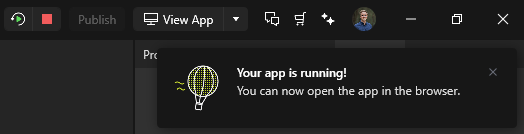
- Stop the timer when the “Your app is running!” message appears.
- Write down the times in column N - R under Benchmark 1.
Press the Run benchmark button and wait for it to finish (approx. 5 mins).
Write down your results in column S - W under Benchmark 2.
Repeat the benchmarks up to 5 times. Especially benchmark #1 (boot time) is important to do at least three times. Completely stop the app and rerun to perform the test again. No need to clean deployment directory in between. You can also perform multiple benchmarks in different configurations to compare the results (Laptop on battery vs. plugged in, enabling high performance mode etc.).
If you prefer to stay anonymous, you can download a copy of the sheet and mail it to me separately at mendixhardwaresurvey.visible078@passfwd.com.
Thank you and please find me on Slack when you have any questions!